Modern Photo Album Design: A Professional Template Guide
Creating a cohesive, visually stunning photo album or magazine doesn't have to be a technical headache. I've seen countless creators struggle with file formatting, layout inconsistencies, and print preparation issues that drain the creative energy right out of a project. That’s why having a solid foundation is everything. If you are looking to produce a high-quality publication that captures memories or showcases a portfolio, relying on a robust Photo Album Design Template is the smartest move you can make. It bridges the gap between your raw content and a polished, professional result.
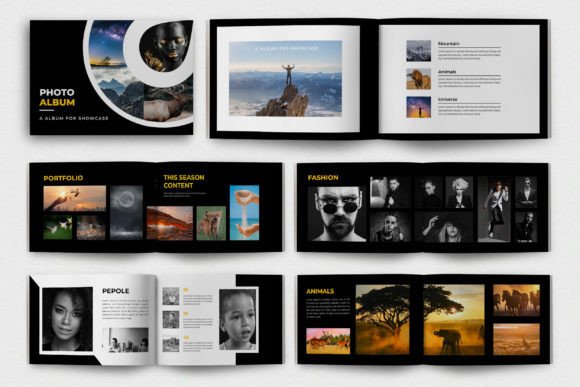
This specific template isn't just a collection of blank pages; it is a fully realized design system built for Adobe InDesign. It offers a clean, contemporary aesthetic that feels right at home in modern editorial design. Whether you are a photographer compiling a lookbook, a small business owner creating a brand asset, or a hobbyist preserving family history, this layout provides the structure needed to let your images shine without the clutter.
The Anatomy of a Polished Editorial Layout
What makes a Photo Album Design Template stand out is its ability to organize information and imagery seamlessly. This particular design features 16 pages of well-organized, layered content. The visual personality is distinctly professional—it avoids trendy gimmicks in favor of timeless structure. Think of it as the difference between a scrapbook and a high-end magazine. The grid systems are balanced, allowing for generous white space that makes your photography feel expensive and curated.
One of the most critical aspects of this template is its print-ready nature. It uses a CMYK color scheme and standard A4 paper size, ensuring that what you see on screen translates accurately to the physical product. There is no guesswork regarding bleed areas or margins. For entrepreneurs and marketers, this reliability is non-negotiable. You cannot afford to send a file to the printer only to get back a product with cut-off text or muddy colors. This asset eliminates that risk entirely.
Practical Applications for Creatives and Brands
The versatility of a well-designed template extends far beyond personal photo books. In my experience as a designer, I have utilized layouts like this for a variety of commercial purposes. The clean lines make it an excellent candidate for packaging design inserts or product catalogs. If you run an e-commerce store, you can adapt these pages to highlight your inventory with detailed descriptions and pricing tables.
Furthermore, the Photo Album Design Template is a powerful tool for building brand identity. Consistency is key in marketing, and using a structured template ensures that your visual language remains uniform across different mediums. Here are a few practical scenarios where this asset excels:
- Portfolio Presentation: Artists and designers can use the 16 pages to create a compelling narrative of their work, essential for client pitches.
- Lookbooks: Fashion brands and boutique owners can layout seasonal collections with a professional editorial flow.
- Event Documentation: Wedding planners or corporate event managers can produce high-end recaps for clients or stakeholders.
- Self-Publishing: Bloggers and writers can expand their digital presence into physical media by compiling guides or memoirs.
Because the template is 100% editable, you are not locked into a specific style. You can swap out the free fonts included with your own premium font choices to better match your specific logo design or corporate typography. This flexibility allows you to maintain brand consistency while leveraging the efficiency of a pre-made layout.
Streamlining Your Workflow with Editable Assets
Time is money, especially for freelancers and small business owners. The biggest advantage of downloading a structured file like this is the immediate boost to productivity. The layers are well-organized, meaning you aren't digging through a mess of locked objects and hidden groups trying to find a text box. This is what separates amateur files from professional design assets.
When evaluating a template for your own use, always look at the technical specifications. This bundle includes an InDesign file, which is the industry standard for multi-page layouts. However, consider how the typography interacts with the layout. The included fonts are free to use commercially, which is a massive bonus, but you should always test font pairing if you decide to customize. If the template uses a bold display font for headers, ensure your body text uses a highly readable sans serif font or a clean serif font to maintain visual hierarchy.
Readability is the ultimate goal. No matter how beautiful the layout is, if the text is hard to read, the communication fails. The A4 size is generally comfortable for reading, but be mindful of how much text you pack onto a single page. Use the template’s grid to guide your placement—let the negative space do the work.
Finalizing Your Project for Maximum Impact
Before you hit print or export for web design, take a moment to review the flow of the document. A good photo album or magazine tells a story. The Photo Album Design Template provides the chapters, but you provide the narrative. Ensure that your images are high-resolution (300 DPI for print) and that your color profiles are set correctly.
Ultimately, this resource is about removing barriers. It takes the heavy lifting of layout design off your plate so you can focus on what matters: the content. Whether you are creating a sentimental gift or a corporate brochure, starting with a professional, organized foundation ensures your final product looks intentional, polished, and ready for the world.