Transform Your Brand with a Realistic 3D Neon Text Effect
In the world of digital marketing and branding, grabbing attention is half the battle. While high-quality imagery is essential, sometimes you need a specific style that evokes energy, nightlife, or a futuristic vibe. This is where a high-quality Neon Text Effect becomes an invaluable asset for your design toolkit. It allows you to bypass the steep learning curve of manual 3D rendering and light simulation, offering an automated solution that delivers professional results in seconds.
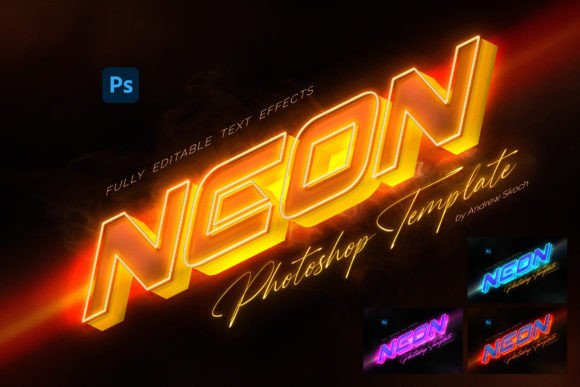
The specific template we are discussing here is designed to simulate the look of a real-world LED neon sign mounted on a surface. Unlike flat, glowing text, this effect creates a sense of depth. It generates a realistic 3D extrusion and a soft, diffused light bloom that mimics how glass tubes actually behave in the dark. The result is a gritty, authentic aesthetic that feels more like a photograph of a sign than a digital drawing. This realism is crucial for modern brand identity work where authenticity drives engagement.
Why This Template is a Game-Changer for Creatives
One of the biggest challenges in design is maintaining a professional standard while working under tight deadlines. This Neon Text Effect addresses that directly through its use of Smart Object Replacement. If you are familiar with Adobe Photoshop, you know that Smart Objects allow you to edit non-destructively. With this template, you simply open the designated layer, place your own artwork—whether it is a logo design, a custom vector shape, or a simple text layer—and save. The template automatically applies the complex lighting, shadowing, and texture effects to your specific design.
This automation is not just about speed; it is about consistency. The package includes 4 PSD Templates, each offering a different color variation (typically cyan, pink, green, or yellow). Because the files are set at 3000×2000 Pixels and 300 DPI, they are versatile enough for both digital use and high-resolution print applications. You do not have to worry about pixelation if you decide to print a poster or a flyer. The well-organized layers mean that even if you want to tweak the background texture or adjust the intensity of the glow, every element is accessible and 100% editable.
Practical Applications: From Social Media to Packaging
The utility of a Neon Text Effect extends far beyond just making cool headers. For social media graphics, particularly on platforms like Instagram or TikTok, neon aesthetics stop the scroll. The high contrast and vibrant colors trigger an emotional response associated with excitement and entertainment. Content creators and marketers can use these templates to create announcements for sales, event invites, or podcast covers that stand out in a crowded feed.
For entrepreneurs and small business owners, particularly those in the entertainment, food, or nightlife industries, this effect is perfect for mockups. If you are designing a menu for a bar or a header for a DJ website, the neon look instantly communicates the right atmosphere. It works exceptionally well for packaging design as well. Imagine a coffee bag or a beverage label featuring a neon accent; it suggests a modern, edgy product.
Furthermore, bloggers and hobbyists can use this for personal projects, such as designing a logo for a YouTube channel or creating custom wall art for their home. Because the template works with pixel layers and folder groups, you are not limited to simple text. You can apply the effect to complex illustrations or icons, making it a truly flexible design asset.
Technical Specifications and Ease of Use
A common issue with design resources is that they often require advanced technical knowledge to customize. This Neon Text Effect kit is built for accessibility. The included PDF help file provides detailed instructions and links to any fonts used in the preview images, ensuring you can replicate the exact look if you choose to.
Because the effect is generated automatically upon saving the Smart Object, the workflow is streamlined. You do not need to understand the intricacies of blending modes, Gaussian blur, or outer glow settings to get a professional result. However, for the designers who do want to dive deeper, the well-organized layers allow for granular control. You can adjust the lighting to match a specific environment or change the texture of the wall behind the sign.
This balance of automation and control makes it an ideal premium font and effect companion. It bridges the gap between a novice user who needs a quick graphic and a professional who needs a high-quality base to build upon. Whether you are working on web design, editorial design, or physical merchandise, the 300 DPI resolution ensures your work remains crisp.
Enhancing Visual Hierarchy and Brand Perception
Using a Neon Text Effect does more than just add color; it changes how your audience perceives your message. In visual hierarchy, light sources naturally draw the eye. By making your text or logo the source of light, you ensure it is the first thing a viewer sees. This is a powerful technique for logo design when you want to project a brand personality that is modern, bold, and energetic.
It is important to use this effect judiciously. While it is tempting to apply it to everything, the impact is greatest when used as an accent or a focal point. Pairing a neon header with a clean, sans serif font for body text creates a beautiful contrast that aids readability. Conversely, using it alongside a script font can create a retro-glamour vibe suitable for wedding invitations or boutique branding.
Ultimately, this resource is about empowerment. It gives crafters, publishers, and business owners the ability to produce high-end visual content without the high-end price tag of a custom 3D artist. By leveraging the Smart Object technology and the high-resolution files provided, you can transform a standard logo into a glowing beacon that captures attention and enhances your brand’s professional image.