Land More Interviews: Your Professional Resume Template Guide
That stack of applications sitting in your inbox? It feels like shouting into the void. You have the experience, the skills, and the drive, but when your resume looks like every other plain document in the pile, it is hard to get noticed. We have all been there—struggling to align text boxes in Word or fighting with margins that just won’t stay put. You need a document that looks sharp, reads clearly, and actually gets past the initial screening.
This is where a high-quality design asset changes the game. We are looking at a Professional Resume/CV Template designed to bridge the gap between high-end design and practical usability. It is not just about making things pretty; it is about using modern typography and structure to tell your career story effectively. Whether you are a graphic designer applying to an agency or a small business owner pivoting to a corporate role, the visual language of your resume speaks volumes before a recruiter reads a single word.
The Anatomy of a Perfect First Impression
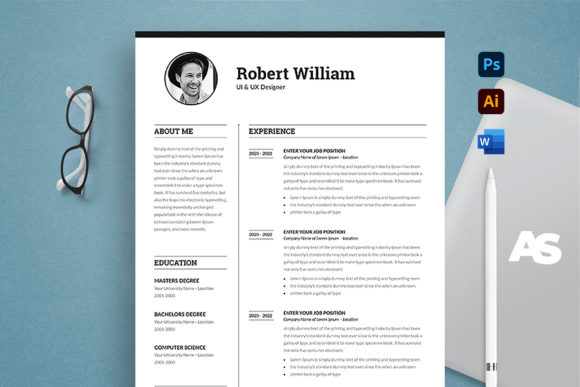
Let’s talk about what makes this specific template stand out. It is built on the foundation of professional design principles, specifically tailored for A4 Paper Size. This is crucial because US Letter size often looks awkward in international contexts, whereas A4 is the global standard for professional correspondence. The design features a clean layout with a 0.25 inch bleed setting, which means your background colors or design elements can extend to the very edge of the paper without leaving that awkward white border if you decide to print it professionally.
The visual personality here is one of structured clarity. It balances white space with content density perfectly. In the world of graphic design, we often talk about "visual hierarchy"—the way your eye moves from the most important information to the least. This template guides the recruiter’s eye naturally from your name and title down to your experience. It utilizes sans serif fonts for headers to convey modernity and approachability, while likely pairing them with a clean serif or sans-serif body text for maximum readability. This combination creates a rhythm that makes dense information easy to digest.
Adaptability Across Formats: Word vs. Photoshop
One of the biggest hurdles with premium resume templates in the past was the software requirement. You either needed to be a wizard in Adobe InDesign or settle for a clunky Word document. This template solves that by offering files in both Microsoft Word (.docx) and Adobe Photoshop (.psd).
Why does this matter for your brand identity? If you are a marketer or entrepreneur who lives in the Microsoft ecosystem, the Word file allows you to edit text, change colors, and update dates instantly without learning new software. However, if you are a creative professional—a photographer, illustrator, or designer—the Photoshop file gives you pixel-perfect control. You can tweak the kerning, adjust the font pairing, or integrate custom graphics that match your portfolio. The inclusion of Adobe Illustrator (.ai) files takes this a step further, allowing for vector-based editing which is essential for high-quality print design.
This flexibility ensures that your resume remains a living part of your design assets, ready to be tweaked for a specific job description in minutes. You can easily swap out a display font for something more corporate if you are applying to a bank, or keep it edgy with a script font accent if you are applying to a boutique studio.
Technical Precision: Print-Ready and Pixel Perfect
Nothing screams "amateur" louder than a blurry logo or a pixelated profile photo. This template is set to 300 DPI and CMYK Color mode. For the non-designers reading this, DPI refers to Dots Per Inch—300 is the gold standard for sharp printing. CMYK is the color mode used for professional printing presses, whereas RGB is used for screens. If you send an RGB resume to a print shop, the colors will shift, often looking duller or neon-bright compared to what you see on your monitor.
By using this template, you are ensuring color consistency. The bleed setting allows you to use background colors confidently. Imagine a deep navy sidebar with your contact information in white—this creates a strong visual hierarchy and separates your skills from your work history. This kind of structured layout is a hallmark of professional typography and editorial design. It signals to the hiring manager that you understand details, organization, and presentation—traits valued in every industry from web design to project management.
Real-World Application and Audience Fit
Who is this for? The short answer is almost everyone. The long answer depends on how you customize it.
For the Corporate Professional: Stick to the standard layout. Use the Microsoft Word file to ensure the formatting remains stable when opened on different computers (a common issue with complex Word docs). Keep the color palette neutral—charcoal, navy, or slate grey. This projects stability and professionalism.
For the Creative and Hobbyist: If you are a crafter, blogger, or content creator, you might want to inject more personality. Use the Photoshop or Illustrator files to introduce a custom color palette that matches your Instagram grid or website. You might swap the standard contact icons for hand-drawn vectors. This turns your resume into a piece of packaging design for your personal brand.
For Entrepreneurs and Marketers: Your resume often doubles as a capability statement. You can use this template structure to highlight case studies. Instead of just listing job duties, use the clean columns to feature "Key Results" or "Campaign Successes." The clean sans serif font keeps it looking like a modern business proposal rather than a dry CV.
Choosing Your Typography Strategy
The template comes with links to free fonts, which is a massive advantage. Commercial fonts can be expensive, and licensing them for different uses can be complicated. By using high-quality free fonts, you maintain a professional look without legal headaches or extra costs.
When you open the file, look at the font pairing. Typically, a strong resume uses a bold, geometric sans-serif for headers to grab attention, and a humanist sans-serif or classic serif for the body text to ensure comfortable reading over long paragraphs. If you decide to change the fonts, test them first. A handwritten font might look fun on your screen, but if a recruiter’s system doesn’t have it installed, it will default to Times New Roman, ruining your layout. Stick to widely available system fonts or embed your fonts if saving as a PDF (which is highly recommended).
Final Polish: The Details That Matter
Before you hit print or send, run through this checklist based on the template’s features:
- Margins and Bleed: Ensure your text doesn't get too close to the 0.25 inch bleed area. Keep the "live area" (where your text sits) safe from being trimmed off.
- Color Mode: Double-check that you are working in CMYK if you plan to print at a shop. If you are only emailing it, PDF format preserves the layout best.
- File Organization: The template is professionally organized and labelled. Respect the layers in Photoshop. It makes finding that specific text block much easier later.
- Consistency: If you bold one job title, bold them all. If you use a period at the end of one bullet point, use it everywhere. Consistency is the hallmark of professionalism.
Your resume is often the first piece of brand identity a potential employer sees. It sets the tone for who you are. By using a robust, easy-to-edit template, you remove the technical barriers to looking professional. You can focus on what really matters: articulating your value. Whether you are a designer looking for a sleek portfolio piece or a business owner seeking a polished corporate look, having the right file structure and design assets at your fingertips ensures you are always ready for the next opportunity.